
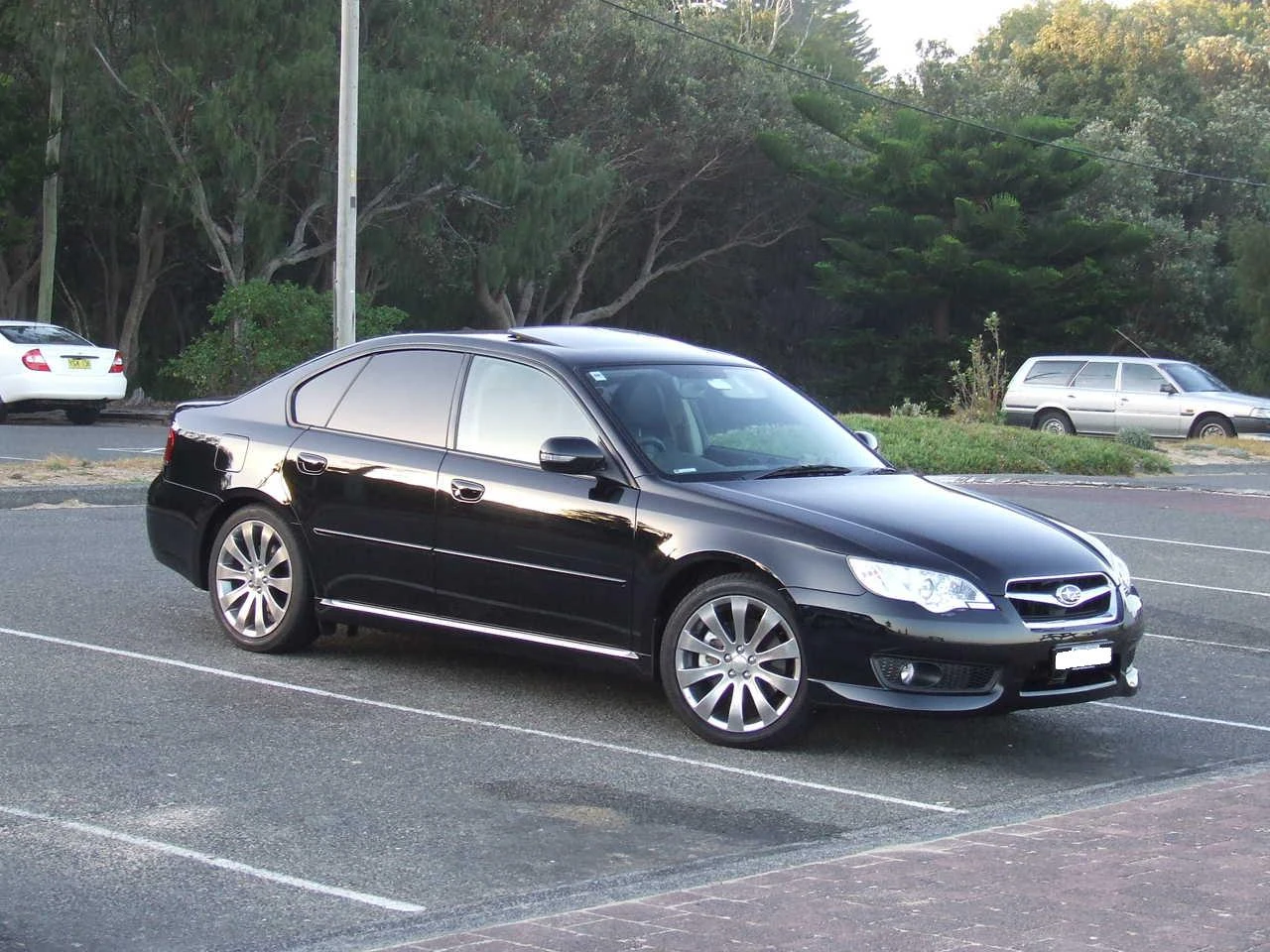
For a UK facelift Legacy 3.0R spec.B, shortlist a Subaru-aware handheld such as the iCarsoft JP V2.0 and confirm the fitted controllers before buying. A generic engine reader can provide a useful starting point, but it does not establish ABS/VDC, airbag or full five-speed automatic access. SI-DRIVE also makes this a different application from the earlier 2004–2006 H6 guide.
Which facelift Legacy does this guide cover?
This guide covers UK-supplied BL saloons and BP Sports Tourers in the facelift MY2007–2009 3.0R spec.B range, with the original H6 engine and management. The six-speed manual and conventional five-speed automatic are considered separately. The UK baseline here is the 3.0R spec.B; a “3.0R” badge alone does not confirm the original market or build.
Subaru’s European facelift announcement places the revised range in autumn 2006 and identifies SI-DRIVE on 3.0-litre models. The reproduced UK MY2007 launch release lists the Legacy 3.0R spec.B in both body styles with manual or automatic transmission. Use build and applied-model details rather than registration year alone: a late-2006 registration can belong to MY2007, while a 2009 registration needs a generation check.
Excluded are pre-facelift cars, Outback models, Japanese and other imports, turbocharged 2.0/2.5 GT variants, diesel and other petrol engines, later BM/BR cars, CVT applications, engine/ECU swaps, remaps and standalone management. “spec.B” was used differently across markets. An overseas turbo spec.B compatibility result is not evidence for this UK naturally aspirated H6.
The best scanner starting point
| Option | Best use | What to confirm |
|---|---|---|
| iCarsoft JP V2.0 with Subaru software | Main owner shortlist for manufacturer-aware diagnostics | UK facelift H6 build, engine, ABS/VDC where fitted, SRS and 5AT controller if applicable; codes and live data separately. |
| iCarsoft TYT V1.0 with Subaru software | Budget Subaru-aware comparison | Current supplied software, actual system coverage, update arrangements, price and returns. |
| Subaru specialist with suitable legitimate SSM equipment | A particular controller or warning the owner tool cannot document | Older UK Legacy support, interface and requested system before booking. |
| Compatible generic EOBD reader/app | Limited emissions-related engine investigation | Supported engine codes/data only; no assumption of whole-car coverage. |
The JP V2.0 manufacturer page describes a standalone handheld with a 4-inch display and free lifetime updates. It is our preferred documentary shortlist for an owner seeking Subaru-aware access. Confirm the supplied unit, Subaru software version, update-computer requirements and seller support. Unusual Cars has not independently tested it on this Legacy.
The iCarsoft Europe Subaru function sheet includes Legacy and diagnostic categories such as engine, transmission, ABS and SRS. It is a reference list rather than a mapping of every UK model year and controller. Ask for confirmation of the particular system and task; code reading, clearing and live data are separate capabilities. A brand-wide tick cannot confirm all of them on your car.
The TYT V1.0 is the cheaper Subaru-aware alternative to compare, with a smaller 2.8-inch display. Check current cost and coverage rather than assuming it is always the better buy. A more expensive JP model also needs a documented benefit on this exact Legacy: newer service menus, coding claims or active-test marketing do not establish support for a 2007–2009 H6.
Six-speed manual and five-speed automatic: different requests
| Application | Ask for | Do not assume |
|---|---|---|
| Six-speed manual | Engine, fitted brake/stability controller and SRS access for the UK H6 build | A transmission menu means an automatic TCM is fitted, or that a US turbo spec.B profile applies. |
| Five-speed automatic (5AT/5EAT) | The above, plus this automatic controller’s codes and the specific live values required | An engine connection or transmission-related engine code proves full TCM access. |
If the automatic gearbox is the reason for buying the scanner, make that the first compatibility question. Ask about the exact warning, controller and information needed. Do not assume transmission temperature, learned values, resets or adaptations are available because another Subaru owner can display them. Paddle shifts identify a driver control; they do not certify a diagnostic function.
The period UK release distinguishes SVDC equipment on the automatic listing. Keep ABS and stability-control coverage tied to the actual build rather than copying one identical system list across both gearboxes. A scanner’s VDC label is not evidence that every manual car has the same stability hardware or software. Confirm fitted equipment from the vehicle documentation and identity.
SI-DRIVE: what the scanner question actually is
SI-DRIVE provides selectable engine-response modes on these facelift H6 cars. It should not be treated as a separately guaranteed scanner module or a reason to buy a tuning function. If a mode indication behaves unexpectedly, record the exact display, warning lamps and circumstances, then seek access to the relevant fitted controllers.
A generic P-code report can be useful, but it does not explain every warning or establish that a selector switch has failed. Equally, a “Subaru all systems” advert does not promise a dedicated SI-DRIVE test or live-data item on this build. Ask what the tool can actually read. This guide provides no mode reprogramming, ECU flashing or calibration procedure.
ABS, VDC and airbag access must be checked separately
An engine scan and a scan of the brake or restraint controller are different jobs. Ask explicitly about ABS, VDC where fitted and SRS on the identified car. If you need a particular live value, such as individual wheel-speed information, name it when checking coverage. Reading ABS fault codes does not automatically include every data item or active test.
An owner discussion about a 2007 Outback illustrates why this distinction matters: the owner wanted brake, restraint and headlamp information beyond engine/transmission access. That is a useful question, not proof of scanner compatibility on this H6 Legacy. A missing menu can indicate a coverage or profile-selection problem; it cannot be reported as a clean bill of health.
Where a generic OBD2 reader still helps
A compatible standards-based reader can retrieve supported emissions-related engine codes and standard data, with available freeze-frame and readiness information. It is useful for an initial engine-warning record. It cannot be assumed to scan every Subaru controller simply because it uses the same 16-pin socket.
Save the full code, its status and available operating conditions before clearing memory. A code description identifies a detected condition, not a confirmed failed part. An oxygen-sensor, catalyst or misfire description needs appropriate investigation; it is not an instruction to buy the component named on screen. “No engine codes” also does not explain a separate brake or airbag warning.
FreeSSM and laptop routes
FreeSSM is worth considering for an owner comfortable matching software and interfaces, but its documented scope is engine and transmission control units. That does not establish ABS, VDC, SRS or body-system access. On a manual car, the transmission wording does not add an automatic controller.
Check the documentation for the actual release before buying a cable. The reviewed FreeSSM help describes compatible K/L pass-through interfaces and says ELM interfaces do not work with that route. Do not assume every USB adapter, an old packaged release and current development code have identical support. The project lists Windows and Linux; confirm operating-system and driver requirements. Exact connectivity on your facelift ECU remains a compatibility question, not a promise based on the model name.
RomRaider is an engine logging/tuning project with definition and interface requirements. It is not evidence of whole-car brake or restraint diagnostics. Neither laptop route should be sold as a substitute for every system a Subaru specialist may need to inspect. Use legitimate software sources and avoid unverified dealer-software downloads.
Questions facelift H6 owners need answered
Engine warning, cruise indication and SI-DRIVE behaviour: one fault or several?
The combination alone is not a diagnosis. Record each indication and obtain the available codes from the relevant controllers. Related-generation owner warning discussions show why an engine-only report can leave questions unanswered; another owner’s sensor diagnosis must not be transferred to this car. This guide does not certify that a car with warning lamps is safe to continue driving.
Can a scanner reset the warning and prove it is fixed?
Clearing memory does not repair a fault. It can remove useful evidence and change readiness information. Keep the original report and use the appropriate diagnostic and repair process. Avoid repeatedly erasing a returning warning or choosing a service reset merely because the menu offers it.
Will a 2004–2006 Legacy recommendation cover the facelift automatically?
No automatic guarantee follows from the shared H6 name. Give the seller the facelift build, original market and gearbox, plus the controllers required. The earlier guide remains useful for its own application; its exact equipment and software assumptions must not be copied into this one.
Love cool cars? Join Unusual Cars Club FREE!
Get forgotten motoring finds, stories, helpful car content and more.
Free to join. No spam. Unsubscribe whenever you like. See our privacy policy.
What to send a scanner seller or workshop
- UK-supplied facelift Legacy 3.0R spec.B; saloon or Sports Tourer; build/applied model and original gearbox. Share vehicle identity through the seller’s appropriate support channel.
- Original or changed engine/ECU and any known calibration history. A badge does not verify the installed management.
- The exact warning and the controller required: engine, ABS/VDC where fitted, SRS, or the five-speed automatic.
- The task required: reading codes, clearing after appropriate repair, or particular live values. Request confirmation for each function.
- The hardware/software version offered, update-computer needs, support and returns if the documented application is not covered.
Follow the vehicle and tool connection instructions, use the scanner while stationary and preserve the report. Do not bridge pins, join loose under-dash connectors or run restraint/brake actuator tests from an unrelated forum recipe. For brake, restraint or significant drivability concerns, arrange appropriate professional diagnosis.
A Subaru dealer or suitably equipped independent is the practical next route where the required owner-tool access cannot be documented. Subaru Select Monitor is the manufacturer diagnostic reference, but ask whether the workshop’s actual installation and interfaces support this older UK build and the specific system. Request a saved report identifying what could and could not be accessed.
Limits of this guide
Reading codes, clearing memory, displaying live data, running active tests, service resets, calibration, coding and programming are separate operations. No coding, programming, calibration, active-test or security-access function is guaranteed here. Exact capabilities vary by vehicle build, module, software, interface and tool version. This is documentary research; Unusual Cars has not independently tested this vehicle, scanner or function.
Related Subaru guides
Use the Subaru diagnostic-scanner hub or the main OBD directory. Earlier cars have their own 2004–2006 Legacy 3.0R / spec.B scanner guide.
Sources and review
Reviewed 27 October 2026. Manufacturer and software-project documentation support the product/software descriptions. The reproduced UK release is distinguished from the hosting owner profile. Owner discussions identify questions only; their repairs and compatibility claims are not transferred to this H6. Overseas turbo spec.B specifications are excluded from the UK scope.
- Subaru European facelift announcement
- Reproduced Subaru UK MY2007 release
- iCarsoft JP V2.0 manufacturer page
- iCarsoft Europe Subaru function list
- iCarsoft TYT V1.0
- FreeSSM official README
- FreeSSM interface help
- RomRaider project
- Subaru Select Monitor III announcement
- UK owner question: fault code reader
- UK owner question: 2007 Outback cruise control
Facelift MY2007 Subaru Liberty 3.0R spec.B, photographed in Australia. Illustrates the facelift H6 body style; UK equipment and diagnostic coverage must be checked separately. Photo: HarrisonB / Wikimedia Commons, public domain. Converted to WebP; no visual alterations.