For an early Mazda6 GJ 2.2 diesel, the best scanner purchase is one that helps preserve and explain the diagnostic evidence. A returning DPF warning is not a reason to shop only for a reset button. Start with the fault record, its status and the specific engine information needed to investigate the complaint.
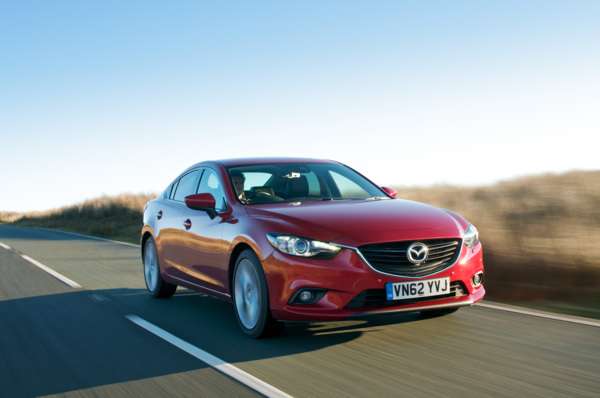
Launch-era Mazda6 saloon from Mazda’s UK media archive; © Mazda, editorial use. Representative range photograph.
Which car does this guide cover?
This guide covers early UK third-generation GJ Mazda6 saloon and Tourer models with the 2.2 SKYACTIV-D diesel, anchored to the 2013–2015 range. Both diesel outputs require build-specific checks; the manual front-wheel-drive car is the reference specification. It excludes the older GH diesel, petrol engines and later revisions unless separately confirmed.
Mazda reference material: Mazda’s launch-era UK archive identifies saloon and Tourer bodies and the diesel range. Body shape and a 2.2 badge alone do not establish the software and controller specification.
Generic OBD2 versus Mazda-aware diagnostics
Standard OBD/EOBD is principally an emissions-related diagnostic route. A capable reader may provide supported engine fault codes, readiness, freeze-frame information and live values. The exact information depends on both car and tool. That access does not establish communication with ABS, restraints or every body controller. Some inexpensive tools also offer enhanced functions: compare confirmed coverage, not price alone.
| Owner question | What a basic check tells you | What to confirm |
|---|---|---|
| Returning DPF warning | An engine code can document a complaint without identifying its cause. | Complete report, status and relevant context. |
| Current and non-current codes | Different statuses should be retained, not collapsed into one diagnosis. | How the exact tool reports status on this build. |
| Scanner advertises DPF service | A menu label is not a confirmed diagnostic or repair outcome. | Specific readings and vehicle coverage before purchase. |
Explore iCarsoft JP scanners on Amazon UK — check the exact model, seller and current coverage for your vehicle and required functions. These search results include different JP versions and may include other products; inclusion is not confirmation of compatibility.
Affiliate link: we may earn a commission at no extra cost to you. As an Amazon Associate I earn from qualifying purchases.
What an owner report actually shows
Mazda6 owner report: recurring DPF inspection warning: A New Zealand owner of a 2014 2.2 diesel described a DPF inspection warning that returned after a forced regeneration. The reported dealer record distinguished current P243C from non-current P117A and C1A67, and the owner described oil dilution and conflicting repair proposals. A follow-up said diagnostics showed many unsuccessful regeneration attempts and that the dealer had extinguished the warning. The accessible discussion does not establish a completed repair or the correct underlying diagnosis.
The useful lesson is to retain the diagnostic report and distinguish current records from older ones. A warning disappearing after intervention does not establish that the cause is repaired. This overseas account is not a UK failure-rate study, and the competing injector and turbo suggestions are not verified conclusions. It supports asking for better evidence rather than selecting a tool solely because it advertises regeneration.
What the iCarsoft catalogue lists
We checked the official function lookup on 3 November 2026 using this exact selection: JP V3.0 → MAZDA → MAZDA6 / ATENZA (SH / Other) → 2.2L → Other → Other → Other.
The expanded PCM result lists fault reading, module information, fault-memory clearing and Live Data → View Data. It also contains a Diesel Particulate Filter service heading. ABS has fault-reading and live-data entries. These listings support a targeted compatibility enquiry; they do not identify the exact evidence available from an early GJ.
There is no explicit GJ year selection in this result. Its broad controller list includes equipment that cannot be assumed present on every early car. The DPF heading does not specify a forced-regeneration routine or named live parameters. Verify the actual engine build and required information; do not infer injector, turbo or DPF condition from a product’s menu titles.
Choosing the complete scanner setup
The JP V3.0 is a standalone handheld. Its maker advertises PC/card-reader updates and no subscription. Confirm the supplied package and update requirements. This guide does not promise coding, calibration, security access or active tests.
FORScan is another candidate, with vehicle and adapter checks required. Windows and mobile versions differ; consult current availability. New Android licence sales are currently on hold.
Ask the supplier: Can you confirm JP V3.0 coverage for my early GJ 2.2 diesel by build and VIN, including code status and the specific engine/DPF readings required for the diagnostic report? Give the VIN, build date, market, engine, transmission and relevant equipment. Ask which software version supports the requested function and what return terms apply if the stated coverage is unavailable. An answer that only repeats “works with Mazda” is not enough.
Love cool cars? Join Unusual Cars Club FREE!
Get forgotten motoring finds, stories, helpful car content and more.
Free to join. No spam. Unsubscribe whenever you like. See our privacy policy.
What to request when repair proposals disagree
Ask each repairer which recorded evidence supports the proposed work, whether the fault is current, and what remains uncertain. Request the original scan report rather than only a verbal label such as “DPF problem”. A useful report separates observations, tests and conclusions. Buying a scanner may help you retain records, but it does not replace the physical checks needed to distinguish competing mechanical explanations. This guide provides no forced-regeneration, emissions-delete, injector-adjustment or warning-bypass procedure.
What to keep from a scan
Save the complete code, controller name, status and any available contextual data before considering a clear command. Note which modules were actually contacted. “No codes” from one engine session is different from a documented scan of the relevant controller. Clearing memory does not repair a cause, and the absence of a warning after a reset is not proof of a successful repair.
This is a documentary scanner-selection guide. Unusual Cars has not independently tested these vehicles, products or functions. Coverage can vary with vehicle build, module, interface, application and tool software. Safety-system repair, programming, immobiliser work and calibration procedures are outside this article.
Is an upgrade worthwhile?
Buy additional coverage when it answers a defined question your present setup cannot answer. If the required function remains unconfirmed, a specialist diagnostic session can be the more useful next step. Mazda diagnostic guide hub provides related context; browse the main OBD scanner guides for other vehicles.
Explore iCarsoft JP scanners on Amazon UK — check the exact model, seller and current coverage for your vehicle and required functions. These search results include different JP versions and may include other products; inclusion is not confirmation of compatibility.
Affiliate link: we may earn a commission at no extra cost to you. As an Amazon Associate I earn from qualifying purchases.
Research checked: 3 November 2026. The linked owner discussion is anecdotal evidence, not a fault-frequency study. The commercial graphics are illustrations and the Amazon destination is a search page, not confirmation that every displayed product fits this car.