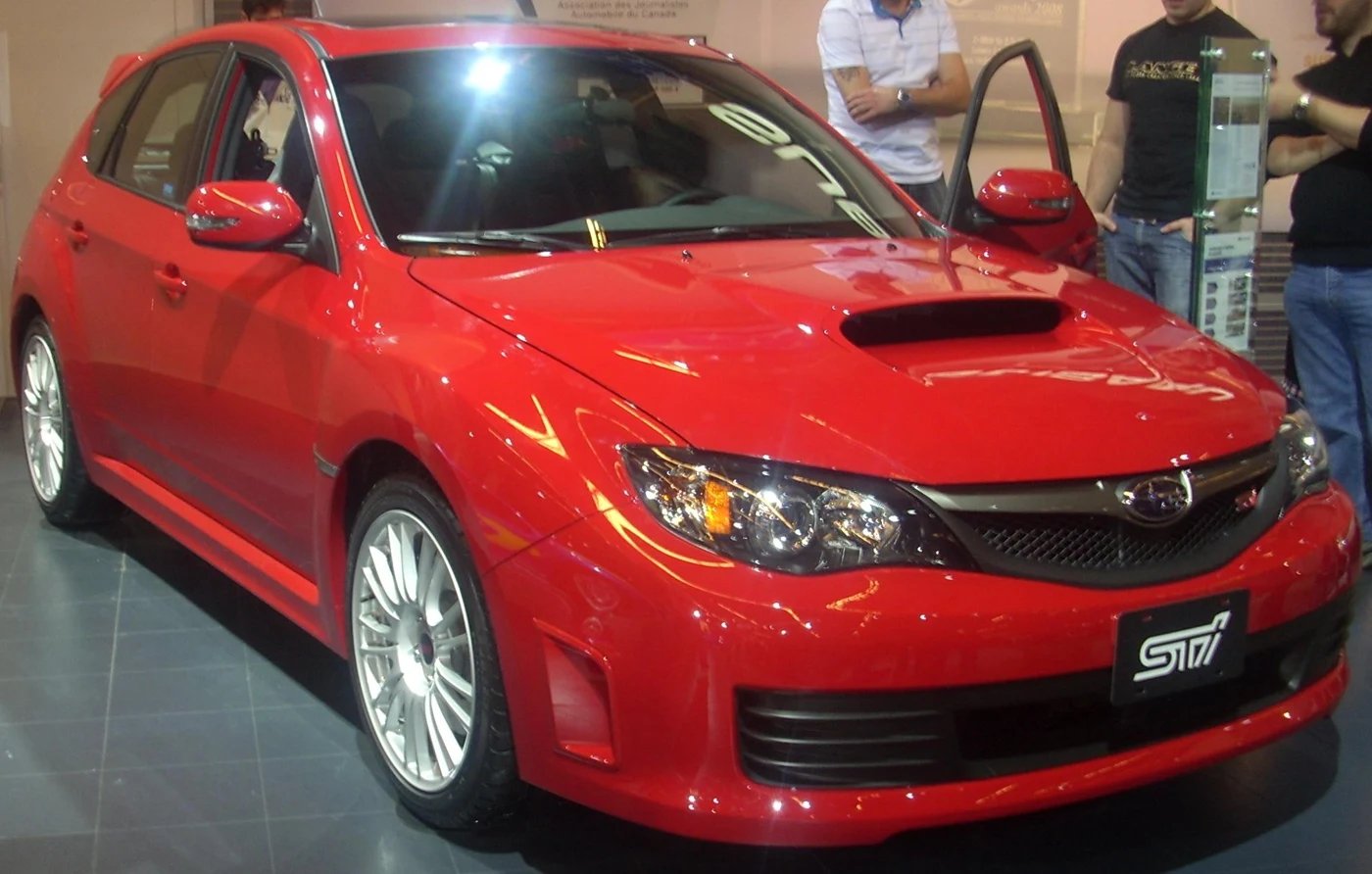
For a standard UK 2008–2010 WRX STI 2.5 hatchback, start with a Subaru-aware handheld such as the iCarsoft JP V2.0, after confirming the exact systems you need. Engine, ABS/VDC, airbag and DCCD access are separate questions. For a DCCD warning or an unconfirmed function, a Subaru specialist with suitable Select Monitor equipment is the stronger route than buying another generic engine reader.
Which STI hatchback is covered?
This guide covers the UK-supplied third-generation five-door Impreza WRX STI Type UK in its standard 2.5-litre turbo, 300PS, six-speed manual configuration across the MY2008–2010 scope. It assumes original engine management and factory DCCD. The reproduced Subaru UK launch release establishes that specification, including SI-DRIVE and stability-control equipment. It does not certify an aftermarket scanner.
Check the applied model, build and original market before using a registration year as a shortcut. A late-registered older car and a later model-year car registered in 2010 need not share the same scope. This page excludes later MY2011 revisions and saloons, Japanese 2.0-litre imports, automatic A-Line imports, 330S, Cosworth CS400, PPP or other remaps, engine/ECU swaps and competition modifications.
Subaru’s July 2009 UK range release distinguishes standard STI Type UK from the ordinary WRX and WRX S and separately promotes a performance package. A standard-looking car can have different management history. Tell the scanner supplier or specialist about known changes rather than selecting a profile from the boot badge.
Quick choice: match the scanner to the STI system
| Route | Best fit and equipment | What needs confirming |
|---|---|---|
| iCarsoft JP V2.0 with current Subaru coverage | Standalone handheld for owners wanting broader diagnosis without a laptop beside the car | Exact UK STI build and engine, ABS/VDC, SRS and DCCD coverage separately; supported codes and required data. Updates are a separate computer/card workflow. |
| Foxwell NT530 Plus with Subaru software | Alternative manufacturer-aware handheld to compare on documented coverage | Correct Subaru package and exact STI controllers. The broad European Impreza/XV 98~11MY catalogue is a starting point, not every-function proof. |
| Subaru specialist with appropriate Select Monitor support | DCCD concerns, unresolved communication or warnings requiring further investigation | Older UK STI support and a report showing which controllers were actually read. |
| Compatible generic EOBD reader or app | Initial emissions-related engine codes and supported standard data | It is not evidence of a DCCD, ABS/VDC or SRS scan. |
Why the JP V2.0 is a shortlist rather than an all-system promise
The manufacturer’s JP V2.0 page describes a standalone 4-inch handheld with free updates and a PC/card update route. The reference Subaru function sheet includes Impreza and lists engine, brake, restraint and DCCD diagnostic categories. However, it does not map every UK model year to every controller. Ask for current confirmation for your exact STI before purchasing.
Put the required task in the question: reading stored DCCD faults, for example, is different from displaying a particular sensor value or performing a calibration. If the seller confirms only engine and ABS access, that does not settle the DCCD question. Retain their specific coverage answer and check update requirements, genuine-unit support and returns.
The official Foxwell catalogue also offers a European Impreza/XV 98~11MY route naming NT530Plus and NT530. The NT530 Plus product is an alternative with Subaru software. That broad listing does not independently establish this Type UK car’s DCCD functions, so compare exact controller evidence rather than the length of a feature list.
DCCD: a separate controller question
DCCD is the STI’s electronically controlled centre-differential system. Its presence does not turn a successful engine scan into a drivetrain scan. The archived 2008 factory manual-transmission and differential diagnostic section describes a Select Monitor III route for DCCD fault information. It also separates the symptom interview from stored-code investigation. The document is a reproduced overseas reference; use it to understand the diagnostic requirement, not to copy wiring checks into a UK car.
For a flashing differential display, record exactly what the display does and what other warnings appear. Ask whether the report includes DCCD memory and the fitted brake/stability controller. A generic application describing a P-code with an unrelated automatic-transmission definition is not sufficient: keep the reporting module, complete code and manufacturer-specific description together.
A DCCD code is not proof that the centre differential itself has failed. Equally, an engine reader reporting no faults cannot certify the DCCD system. Do not use older STI flash-code or connector routines as a substitute for a confirmed scan route. An aftermarket differential controller or drivetrain conversion needs its own supplier information and falls outside this standard-car guide.
ABS/VDC and airbag access: what to ask for
| Reason for scanning | Information to request | Limit to retain |
|---|---|---|
| ABS or stability warning | Fault report from the fitted brake/stability controller; relevant live values if supported | Code access does not establish brake bleeding, output tests or sensor calibration. |
| SRS or airbag warning | SRS fault information from the actual restraint controller | It does not establish crash-data handling, restraint repair or safe continued use. |
| DCCD and stability indications together | Named reports from both relevant controllers, with their communication status | A shared warning event does not identify one failed component. |
| Engine warning | Engine code/status and supported freeze-frame or operating data | A detected condition is not a diagnosis of a turbocharger, sensor or internal engine part. |
Some scanner menus combine ABS and stability functions, while others list them differently. Record the actual system accessed. “Not supported” or “no communication” must remain visible in the report and must not be translated into “no faults”. Brake, stability or restraint concerns call for appropriate professional diagnosis, not repeated clearing.
SI-DRIVE is not a scanner tuning feature
The standard UK STI’s selectable SI-DRIVE response modes are part of its factory equipment. Selecting a driving mode and altering an ECU calibration are different operations. If a mode indication behaves unexpectedly, preserve the warning information and ask about the relevant engine and associated controller reports. No tuning, coding or mode-reconfiguration procedure is offered here.
What a generic reader still contributes
A compatible EOBD reader can be useful when the immediate need is to save emissions-related engine codes, supported standard live data, readiness and available freeze-frame information. The OBDLink manufacturer guide distinguishes standard diagnostics from supported enhanced access. A device with a Subaru fault-description database has not necessarily communicated with Subaru-specific modules.
If you already own a working reader, save its engine report before paying for a replacement. Keep current, pending and other status labels exactly as shown. For an intermittent symptom, record when it happened and any recent maintenance or management changes. An uneventful scan is one observation; it cannot replace further investigation of a recurring drivability concern.
FreeSSM and engine logging: useful boundaries
The FreeSSM project and its English help describe an engine/transmission-oriented application with particular interface requirements and model-year qualifications, including limitations around MY2010 information. That is not an ABS, airbag or DCCD scanner recommendation. A generic ELM adapter is not automatically the interface the software expects.
Check the exact software release, interface and control unit before buying a cable. A network label alone cannot establish compatibility. Likewise, a successful engine logger connection or tuning-device display does not prove a whole-car scan. This guide does not supply firmware, ECU definitions, flashing instructions or unsupported connection workarounds.
Questions behind STI scanner purchases
Can I clear a DCCD warning with an engine-code reader?
Only a tool with the required access can address the reporting system, and clearing is not repair. An earlier-STI owner discussion illustrates confusion between DCCD fault memory and an engine scan after steering-related work. That case involves a 2006 car, not this hatchback; its flash-code and reset suggestions are not instructions for this scope.
Does every 2008–2010 STI use the same scanner profile?
Do not assume so from the year alone. Original market, applied model, management history and fitted controllers all matter. Confirm a UK 2.5-litre Type UK application rather than an imported 2.0-litre or an automatic STI. If automatic identification disagrees with the car’s documentation, resolve the identity before using functions.
Can one scan rule out an expensive engine or differential problem?
No. Fault information can help structure an investigation, but electrical reports do not establish mechanical condition by themselves. Ask what was read, what could not be accessed and what further assessment is needed. Avoid buying a scanner on the promise that one code will determine a repair bill.
Love cool cars? Join Unusual Cars Club FREE!
Get forgotten motoring finds, stories, helpful car content and more.
Free to join. No spam. Unsubscribe whenever you like. See our privacy policy.
Before connecting or booking a scan
- Have the UK build/applied model, standard 2.5-litre STI identity and six-speed gearbox details ready.
- Disclose PPP, remaps, swaps, previous restraint/steering work and aftermarket differential controllers.
- Name the required systems and task: engine, ABS/VDC, SRS, DCCD, a fault report or a particular live value.
- Follow the exact vehicle and tool instructions, use the scanner while stationary and preserve the first report.
- Ask the specialist to distinguish absent equipment, unavailable support and communication faults.
Do not bridge socket pins, join loose under-dash test connectors, probe restraint circuits or run brake/differential output tests from an unrelated guide. Coding, calibration, active tests, ECU programming and key or immobiliser functions are outside this article. Exact capabilities vary by build, module, software, interface and tool version.
Related Subaru guides
For the standard five-speed WRX, use the separate WRX 2.5 hatchback scanner guide.
Start from the Subaru scanner hub or main diagnostic directory. Earlier saloons have their own 2006–2007 Hawkeye STI scanner guide; its coverage is not inherited by this hatchback.
Sources and review
Reviewed 27 October 2026. Documentary evidence supports the defined scope and qualified tool-selection route. UK release material establishes the vehicle; aggregate tool lists do not establish every exact function. Owner reports identify questions and are labelled where outside scope. Unusual Cars has not independently tested this vehicle, scanner or function.
- Subaru UK 2008 STI launch release, reproduced
- Subaru UK July2009 range release, reproduced
- iCarsoft JP V2.0 manufacturer product page
- iCarsoft JP V2.0 Subaru V11.10 diagnostic sheet
- iCarsoft official function/coverage enquiry route
- Foxwell official European Impreza/XV98~11MY coverage query
- 2008 Subaru STI manual-transmission/differential diagnostics, reproduced factory document
- FreeSSM official documentation
- FreeSSM official English help
- OBDLink manufacturer support: diagnostics modes
Illustrative Canadian-market 2009 STI hatchback, Montreal. Photo: Bull-Doser, public domain. Proportionally resized and converted to WebP; UK equipment and diagnostic coverage checked separately. Photograph source · Public-domain information.