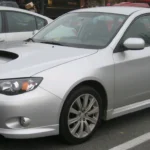
For the UK 2014–2017 WRX STI VA 2.5 saloon, choose a Subaru-aware diagnostic route that addresses engine, ABS/VDC, airbags and factory DCCD separately. A Foxwell NT530 Plus with Subaru software is worth comparing because its European catalogue has named DCCD entries for this period. The iCarsoft JP V2.0 is another conditional shortlist. Confirm the exact UK build and requested functions before buying either; an engine reader or logger is not a complete STI scan.
Identify the VA saloon before choosing software
This page covers the UK-supplied, pre-facelift VA WRX STI four-door saloon with the 2.5-litre turbo petrol engine, original engine management, six-speed manual gearbox and factory DCCD. The reproduced Subaru UK Geneva launch release identifies the new saloon’s UK introduction in May 2014, six-speed manual and VDC with Active Torque Vectoring. The importer’s 2014/15 review independently records its return to UK showrooms.
Use build and model identity alongside registration year. The VA was introduced during 2014, while some international material calls the new car a 2015 model. A scanner’s “2014 WRX” menu can therefore be an ambiguous starting point: it could describe a previous-generation car or another market’s application. Give the supplier the actual VA STI identity and confirmed model year.
The scope excludes earlier GR/GV cars, the non-STI WRX and WRX S4, CVT models, Japanese 2.0-litre and other imports, tuned special versions, remaps, engine or ECU swaps, aftermarket DCCD controllers and competition cars. An original-looking saloon can still have a different calibration or drivetrain history. Record known changes rather than selecting software from the boot badge alone.
Keep the facelift and Final Edition separate
The Subaru UK Final Edition announcement was issued in November 2017 and describes a change from combined mechanical/electronic DCCD control to electronic control. Those later facelift/2018-specification cars sit outside this guide even if first registered in late 2017. Conversely, a later registration does not automatically change an earlier car’s build specification.
That is a scope boundary, not proof that all scanner functions changed together. Confirm the fitted controller and tool software rather than assuming that a menu working on an earlier STI certifies the facelift, or that a revised differential automatically makes every earlier diagnostic function unavailable.
Which diagnostic route fits the job?
| Route | Useful role | The purchase check |
|---|---|---|
| Foxwell NT530 Plus with Subaru software | Manufacturer-aware handheld comparison, including a named DCCD catalogue route | Exact UK VA STI build, required controllers, code reading and any specifically needed live values. |
| iCarsoft JP V2.0 | Alternative Subaru-aware handheld shortlist | Do not treat the aggregate Impreza/system chart as exact VA/DCCD certification; obtain a current application answer. |
| Existing compatible EOBD reader or phone setup | Initial supported engine-emissions report | Adapter, app and vehicle support; engine access does not establish brake, restraint or DCCD access. |
| Subaru dealer or appropriately equipped specialist | A focused investigation when coverage is uncertain or the warning needs professional assessment | Confirm support for this generation, original DCCD and the relevant systems; request a saved report. |
For one unresolved DCCD or airbag warning, a documented specialist scan may be a better first spend than an unconfirmed handheld. For continued ownership, buy against a list of systems and tasks. A large reset count or a claim to cover every Subaru is not a substitute for identifying this car’s controllers.
What the Foxwell catalogue actually establishes
The official coverage selector was checked under SUBARU, Europe, WRX/Levorg, then 15MY, 16MY and 17MY with DCCD selected. Each named-controller query returned NT530Plus. This is more specific evidence than a brand-only list, and makes the NT530 Plus a useful option to investigate for this task.
The catalogue still groups WRX and Levorg applications, rather than giving an individual UK STI VIN and software report. Its broad function label must not be read as a guarantee of every live parameter, output test, calibration or programming operation. Specify Subaru manufacturer software and ask what fault reports and data are supported on your exact build. An earlier 2014 registration needs build identification rather than an automatic choice of the catalogue’s older-year branch.
Where the iCarsoft JP V2.0 fits
The JP V2.0 product documentation describes a standalone handheld with a PC/card database-update route. Its Subaru reference sheet names Impreza through 2018 and includes diagnostic categories such as engine, ABS, SRS and DCCD. It does not present the exact intersection of UK VA STI, year, controller and operation.
That supports a conditional comparison, not a promise that every entry applies to this saloon. Use the official coverage route or a knowledgeable supplier to ask about the VA application and named systems. Request DCCD fault reading separately from engine diagnostics, and list any desired live values. Check the hardware version, installed database, update requirements and support supplied.
DCCD access is not an automatic-gearbox scan
This STI has a six-speed manual gearbox and an electronically controlled centre-differential system. A scanner’s ordinary automatic-transmission or CVT menu is not proof that it can read factory DCCD. Equally, the physical gearshift working normally does not establish that the differential controller has no recorded concern.
For a DCCD warning, ask whether the equipment can communicate with that controller, identify it and retrieve its fault information. Save full codes, status and available context. If a requested live value is important, name it rather than asking for “all AWD data”. A controller being listed does not mean every parameter or service operation has been established.
The term “reset” also needs care. Erasing a stored fault, returning a driver-selected mode to a default, retaining a setting after ignition-off, calibrating a sensor and changing controller software are different jobs. Tell the specialist which behaviour you mean. Do not buy a coding or programming tool merely because a forum uses the word reset.
Two DCCD bulletins explain why build details matter
Subaru of America’s bulletin 03-75-15 describes a control-module change addressing warning logic on some 2015-model-year cars. Its bulletin 07-105-16 addresses manual-setting retention on certain 2015–2016 models. They concern different behaviours, despite both mentioning DCCD controllers.
These are US-market documents. They do not establish a fault on a UK car, UK campaign or warranty eligibility, or a replacement-part instruction. Their value here is the documentary distinction between warning investigation and a setting-retention concern. A specialist should check the applicable UK build information. No overseas VIN cutoff, tyre threshold, replacement procedure or universal software fix is transferred into this guide.
What if the AWD warning comes and goes?
A 2015 STI owner discussion describes an intermittent AWD warning and disappearing DCCD controls. The UK identity is unconfirmed, so this is an owner-question example, not a diagnosis or compatibility test. Preserve which warning appeared, whether it flashed and what happened to the display; report recent tyre, wheel, drivetrain or electrical work.
Follow the car’s relevant handbook and have the warning assessed appropriately. A disappearing warning does not prove the system is repaired, and another owner’s apparent cure does not establish the cause on your car. Do not reproduce the symptom through high-speed driving or use an undocumented reset as a test.
ABS/VDC and SRS need their own coverage
A clean engine scan cannot rule out a brake/stability or restraint-system fault. Ask for the fitted ABS/VDC and SRS controllers by name. Record whether each system actually communicated, rather than accepting a summary that silently omits unsupported controllers.
The UK launch release identifies hydraulic steering on this STI. A combined WRX/Levorg scanner list may contain power-steering and other equipment menus that are not evidence of what your saloon has fitted. Active Torque Vectoring and VDC appearing in vehicle literature also do not establish a separate diagnostic module for every feature name.
A historical Autel support discussion about Subaru ABS coverage contains questions involving different model years and vehicles. It is not a current VA tool verdict. It illustrates why an answer about an older STI or a different Subaru must not be transferred to this car. Fault reading, wheel-speed data, actuator operation and calibration remain separate questions. Restraint and brake repair require appropriate professional assessment.
Love cool cars? Join Unusual Cars Club FREE!
Get forgotten motoring finds, stories, helpful car content and more.
Free to join. No spam. Unsubscribe whenever you like. See our privacy policy.
Engine data and logging do not replace a full scan
A compatible generic reader can save supported emissions-related engine codes, status, freeze-frame information, readiness and standard live data. Keep the initial report before clearing anything. A code identifies a line of investigation; it is not a parts-replacement instruction. No engine code also cannot certify the engine or drivetrain’s mechanical condition.
The OBDLink diagnostics guide distinguishes manufacturer parameters from enhanced module diagnostics and notes the mainly North American scope of its enhanced add-ons. A Subaru-labelled engine gauge or logger does not establish UK ABS, airbag or DCCD access. Check the complete adapter, app, operating-system and vehicle combination. ECU logging and flashing products need their own application evidence and are not recommended here as whole-car diagnostic substitutes.
Does an older FreeSSM cable make sense?
The reviewed FreeSSM documentation describes legacy model-year and interface support, with qualifications around 2010 and an engine/transmission focus. It does not establish VA 2014–2017 support or an ABS/SRS/DCCD route. Do not buy a legacy cable because it worked on a previous Impreza; a familiar socket does not make interfaces interchangeable.
This is a limit of the reviewed evidence, not a blanket claim that CAN-equipped cars can never use any older diagnostic route. Choose software and hardware from documented support for the actual controller. No cable modification, connector bridging, ECU definition installation or flashing workaround is provided here.
A useful specification to send the supplier
“I have a UK-supplied pre-facelift WRX STI VA 2.5 four-door saloon, build/model year [confirmed identity], with original engine management, six-speed manual and factory DCCD. I need engine, ABS/VDC, SRS and DCCD fault reports, plus [named live value if required]. Can this exact tool and Subaru software support those controllers? Which functions or systems remain unavailable?”
Include known modifications, controller replacements and previous repair history. Ask about the software supplied, updates, documentation, seller support and return arrangements. Save the response. If the seller can confirm engine access but cannot answer DCCD, choose it only for the confirmed tasks or use a specialist for the differential investigation.
Keep the first report useful
- Use the car and scanner instructions for connection and power requirements; operate the device while stationary.
- Save controller identity, full codes, status and any available operating context before erasing evidence.
- Distinguish no faults reported, unsupported system and no communication; they have different implications.
- Use appropriate professional diagnosis for drivetrain, brake, restraint or unexplained communication concerns.
Exact capabilities vary by build, module, fitted equipment, interface and tool/software version. Fault reading, clearing, live data, active tests, service routines, calibration, coding and programming are separate operations. This guide guarantees none of the higher-risk functions and provides no immobiliser, key or security-access instructions.
Related Subaru guides
Use the Subaru diagnostic-scanner hub and main OBD directory. The 2008–2010 STI 2.5 hatchback scanner guide covers an earlier generation; choose it only for that scope.
Sources and review
Reviewed 28 October 2026. This is desk-researched editorial guidance. UK release/importer material establishes the vehicle scope; manufacturer tool documentation supports qualified selection. Overseas bulletins and owner reports retain their limits. Unusual Cars has not independently tested this vehicle, scanner or function.
- Subaru UK Geneva launch release, reproduced
- IM Group2014/15 review, pages6–7
- Subaru UK Final Edition release, reproduced
- Foxwell European WRX/Levorg controller queries
- Foxwell NT530 Plus manufacturer page
- iCarsoft JP V2.0 product documentation
- iCarsoft Subaru V11.10 reference chart
- iCarsoft official coverage route
- Subaru of America bulletin03-75-15
- Subaru of America bulletin07-105-16
- OBDLink manufacturer diagnostics guide
- FreeSSM official help
Illustrative UK-registered 2015 pre-facelift WRX STI VA saloon. Photo: Calreyn88, Wikimedia Commons, CC BY-SA 4.0. Proportionally resized and converted to WebP under the same licence; natural background retained. Photograph does not establish calibration, modification history or diagnostic coverage.