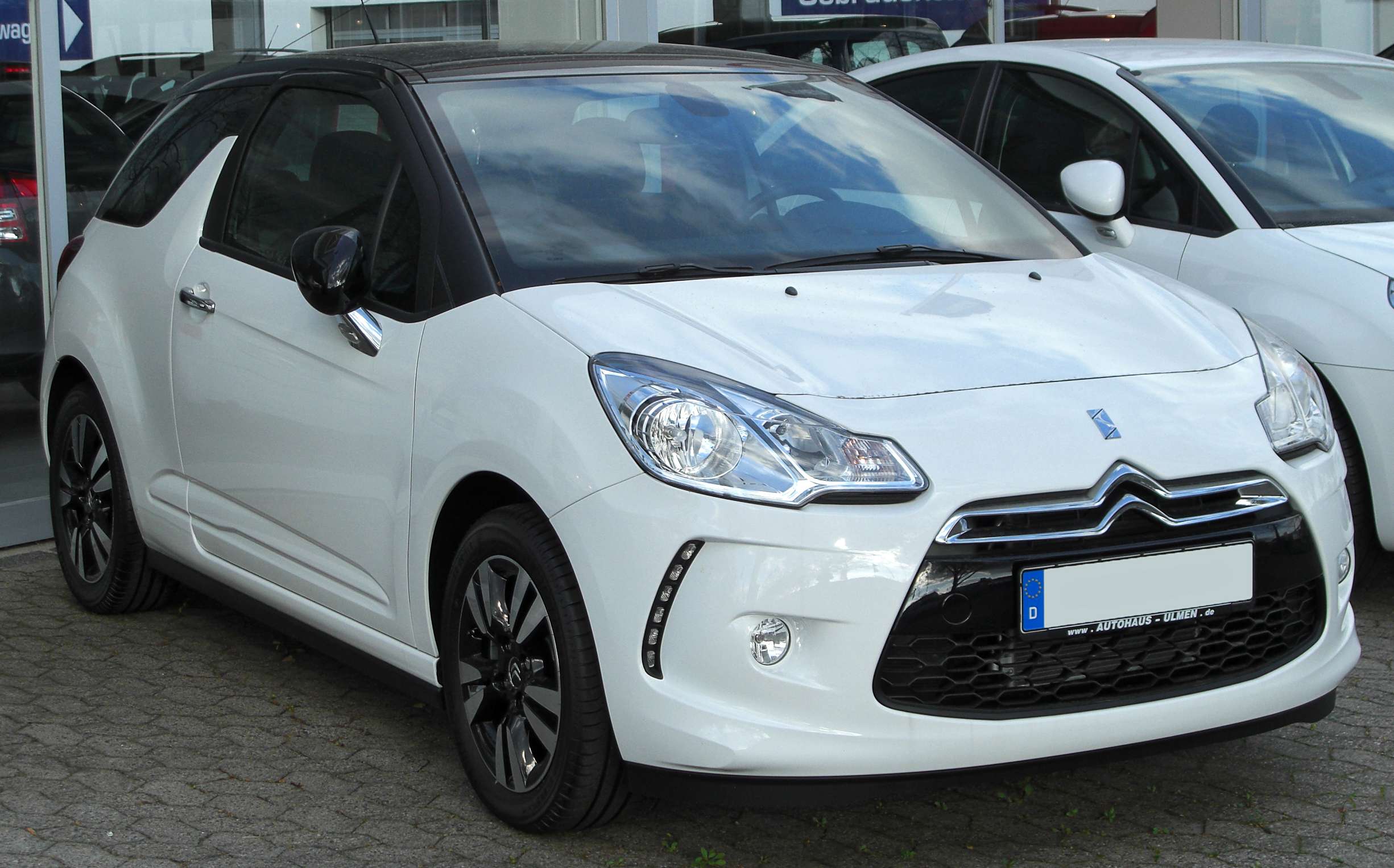
A Citroën DS3 diagnostic scanner needs to match the original hatchback’s engine and electronics, not merely a badge on the bonnet. The DS3 range changed during its life, and the later DS 3 name can also lead to confusion with a completely different crossover.
This guide is for the original Citroën DS3 three-door hatchback and Cabrio, including the same model line subsequently sold as DS 3. It does not cover the DS 3 Crossback or the later crossover renamed DS 3. Modified cars and specialist performance derivatives need their own exact-specification checks.
Which diagnostic route is sensible?
For supported engine-emissions codes and basic data, a reputable EOBD reader can be sufficient. For ABS, airbags, body systems or an electronically controlled gearbox, look for confirmed enhanced coverage. For adaptations, coding or replacement-module work, ask about the exact procedure separately.
iCarsoft FR V3.0 is one possible handheld to investigate. Ask the supplier how your particular Citroën-badged or DS-badged car is selected and which functions are supported. Do not assume that every DS menu, every Citroën menu or every product carrying “French cars” in its description covers your specification.
If the car has a single difficult fault, buying a detailed diagnosis from an experienced specialist may be better value than buying a tool with uncertain access. A report is most useful when it includes the evidence and the tests behind the proposed repair.
Identify the original DS3 correctly
Give the seller the VIN/build information, engine designation, gearbox and body type. The year alone is not enough to separate engine and transmission changes. Explain that it is the original hatchback or Cabrio, rather than the later Crossback.
DS’s manufacturer announcement in May 2015 documents a useful example: the PureTech 110 received EAT6, replacing a previous VTi 120 four-speed automatic combination. The same announcement records other engine updates. These are meaningful differences for a compatibility enquiry, even when the cars look closely related.
For a Cabrio, mention the roof if that is the reason for scanning. Engine diagnostics do not demonstrate roof-system coverage. A roof fault may need mechanical and water-ingress checks as well as electrical investigation.
Match coverage to your actual job
| Job | Useful capability | Do not assume |
|---|---|---|
| Read an engine warning | Supported EOBD codes and operating data | That every other ECU is included |
| Investigate ABS/ESP | Enhanced access and relevant input data | That an engine-only clean scan clears the car |
| Investigate an airbag warning | Confirmed SRS report | That erasure repairs a restraint-system fault |
| Investigate gearbox behaviour | Exact transmission-controller coverage | That four-speed automatic and EAT6 are interchangeable |
| Investigate diesel emissions | Coverage matched to the fitted HDi/e-HDi/BlueHDi system | That DPF and AdBlue functions are the same |
| Repair or calibrate a system | The named procedure on the fitted controller | That “all systems” includes all programming |
What a basic engine reader can contribute
Save the complete fault code, status and description before clearing anything. Where available, preserve freeze-frame information showing the conditions when the fault was recorded. Add a note about what the car was doing and what the driver noticed.
An intermittent warning can be easier to understand when you know whether it appeared on a cold start, after warming up, during acceleration or while idling. A screenshot of the dashboard message is useful alongside the diagnostic report.
Do not treat a code as a shopping list. A sensor-related code can concern the signal, wiring or operating condition rather than a failed sensor. A misfire report can need ignition, fuelling or mechanical checks. The correct next test depends on the whole picture.
Live data is most useful when it answers a specific question. Compare values with the correct engine information and sensible operating conditions, rather than applying an internet threshold from another engine. A generic app can also label data differently from a manufacturer-aware tool.
Petrol engines: avoid a one-size-fits-all diagnosis
The DS3’s petrol range includes different engine families and outputs. Match the actual unit before choosing a menu, interpreting a code or applying maintenance advice. A procedure demonstrated on one DS3 petrol variant does not automatically apply to another.
For rough running, note whether the problem is constant or temperature-dependent. Preserve the first report and any relevant data before parts are swapped. If work has already been attempted, keep a list of what changed and whether it altered the symptoms.
For a turbocharged car with a power complaint, a boost-related code is still only evidence of a detected condition. The investigation may need to compare readings and inspect the relevant air path, control components and connections. Do not buy a turbocharger solely because a short code description mentions boost.
Mechanical noises, an oil-pressure warning or overheating need the response specified by the vehicle instructions. A diagnostic scanner cannot directly certify the timing drive, oil supply, compression or cooling-system condition. A car can have a significant mechanical problem without offering a convenient fault code.
Diesel variants: identify the emissions equipment
Tell the supplier the exact HDi, e-HDi or BlueHDi version. Establish which emissions systems are fitted before discussing DPF, additive or AdBlue functions. The diesel badge alone should not be used to infer every reservoir, controller or reset requirement.
For a particulate-filter complaint, ask which relevant data can be read on that engine. Calculated loading values and pressure-related information need interpretation with the correct repair data. A filter warning does not, by itself, establish that the filter must be replaced.
Where a separate filter-additive system is fitted, distinguish its maintenance from SCR/AdBlue work. Any counter or post-repair operation should correspond to work actually completed. Do not reset information simply to suppress a warning.
For an AdBlue-equipped version, record the exact message and any remaining-distance or starting warning. A genuine low level and a system malfunction need different responses. Follow the matching handbook and have persistent faults investigated; clearing codes is not a universal countdown remedy.
Forced regeneration and other emissions routines need the correct prerequisites. A consumer menu should not be used as an experiment when the underlying fault is unknown.
ABS, stability-control and airbag access
If an engine reader says there are no codes while an ABS or airbag warning remains, check what it actually scanned. Enhanced access to the affected controller is required to obtain its fault information.
ABS data can help a technician compare wheel-speed inputs and investigate a signal problem where the tool supports it. The full code and status matter. A named wheel or sensor can still require checks of wiring, connections and the associated mechanical components.
For an airbag warning, preserve the SRS report and use proper restraint-system procedures. Do not probe airbag connectors or fit devices intended to conceal a fault. Reading or clearing a code does not establish that the system is safe.
If several warnings appear together, record them all before erasure. They may need a coordinated investigation across controllers. Ask which faults appear to be causes and which may be consequences rather than replacing a part for every code.
Automatic gearboxes and post-repair routines
The distinction between the earlier four-speed automatic and EAT6 is especially important. State the exact gearbox and engine when requesting compatibility, and do not rely on a generic automatic-transmission checkbox.
Ask three separate questions: can the tool read transmission codes, can it display the relevant data, and can it perform the named repair routine? Those capabilities are not interchangeable. A reset or adaptation should only be carried out when the correct repair instructions call for it.
Describe a shift complaint in detail, including temperature, gear, vehicle speed and recent servicing. If the engine itself is running poorly, include that information too. On a manual car, clutch or gear-selection problems may still require mechanical checks even when the scan is clear.
Body electronics, battery history and Cabrio equipment
Locking, lighting, wiper or display problems may require body-system access beyond generic OBD2. Confirm the relevant ECU and available data before buying a scanner for these jobs. A report from the engine controller cannot rule out a body-electrical problem.
Recent flat batteries, jump starts, battery replacement or water ingress should be part of the fault history. Supply and connection checks may be necessary to interpret communication errors. A voltage value on a scanner is not a complete battery or charging-system assessment.
For a Cabrio roof complaint, describe whether the roof stops in a particular position, whether the fault is intermittent and whether there is evidence of a mechanical obstruction or water entry. Use a specialist where appropriate; engine coverage alone says nothing about roof operation.
Avoid speculative configuration changes or replacement-module programming. These can require specific information, equipment and supported access. Establish the cause and repair plan before changing settings.
Buying used or diagnosing your own car
For a used DS3, obtain permission before connecting. Save a report and combine it with maintenance records, physical inspection and a suitable road test. Recently cleared codes or incomplete emissions monitoring can limit the report, while a clean scan cannot prove the car has been properly serviced.
For a modified vehicle, tell the repairer about software changes, engine work and additional electrical equipment. Standard coverage information may not describe every change. Do not use this guide as confirmation that a scanner supports a competition car or a non-standard ECU.
A useful scanner enquiry
“I have an original [Citroën DS3/DS 3], [hatchback/Cabrio], [build/year], [engine], [gearbox]. I need [named function] on [named ECU]. Which menu and software support this, and are there any limitations?” Keep the supplier’s response.
Compare report storage, updates, support and returns as well as price. For an app, verify the phone, adapter and paid feature combination. A successful Bluetooth pairing is not proof of communication with the required controller.
Is DS 3 Crossback coverage suitable?
Do not assume so. Confirm coverage for the original hatchback or Cabrio explicitly.
Will clearing a warning fix the problem?
No. Save the evidence, diagnose the cause, repair it and use a rescan to help verify the result.
Does “all systems” include coding?
Not necessarily. Reading faults, carrying out an active test, performing an adaptation and programming a module are different capabilities.
Explore other models in our Citroën diagnostic scanner hub.
Sources and coverage notes
- DS manufacturer announcement: PureTech 110 and EAT6, May 2015, including the earlier automatic comparison and hatchback/Cabrio versions.
- iCarsoft FR V3.0 product and function-coverage references.
- Citroën handbook selector; match the document and brand to the actual car.
This researched guide does not claim hands-on testing or universal DS3 compatibility. Confirm the exact controller and function before purchasing.
Featured photograph: M 93, Citroën DS3 front 20100410, used under the attribution permission stated on the file page. Resized for display. Scanner banner: illustrative artwork.
Love cool cars? Join Unusual Cars Club FREE!
Get forgotten motoring finds, stories, helpful car content and more.
Free to join. No spam. Unsubscribe whenever you like. See our privacy policy.