When an Enyaq refuses to charge, there are at least two ends to the conversation. The charge point might say the vehicle stopped the session while the dashboard says charging is unavailable. Neither message tells you whether to ring the charge-point operator, book the Škoda into a workshop or buy a new cable. A scanner that can read the Enyaq’s charging controller can make a real difference here. One owner recorded an entry naming the plug lock and was able to put a time against it. That is a much better starting point than “it wouldn’t charge yesterday”.
If you already own a cheap engine-code reader, its familiar socket may tempt you to try it. The Enyaq iV has no petrol or diesel emissions system to investigate. The value comes from software that knows this electric Škoda and can reach the charger, energy management, climate control and other fitted units. This guide shows what owners can learn from safely reading those systems, what evidence justifies paying for a better reader, and which questions belong with an EV-qualified technician. The aim is a better decision about the next bill, not a high-voltage repair on the driveway.
Choose a tool for your particular Enyaq iV
Start with the model year, battery version, drive configuration and software details available in the car or on a recent workshop invoice. Earlier Enyaq iV versions and later cars marketed under similar names can have different equipment, software and charging characteristics. Do not judge your car against the fastest charging figure in a current advert. Even within a model family the maximum, conditions and starting state of charge matter. Use the documentation for your version when comparing what it achieved with what you expected. See Škoda UK’s Enyaq AC and DC charging guide.
Ask a tool supplier for something specific. Can the product read the on-board charging controller and show its complete diagnostic trouble code, including the final digits and whether it is current or sporadic? Does it identify the battery management controller and show the labels and units of supported measurements? Can you export a whole-car report? A screenshot showing an app connected by Bluetooth proves communication with the adapter. A report showing a named Enyaq control unit and a relevant measurement proves a good deal more. The app, interface, vehicle software and any subscription can all affect the answer.
A suitable tool may identify different events in different controllers even though you experienced them as one dashboard warning. Think of the gateway as a point where messages between systems can be observed, and the charger controller as a participant with detailed knowledge of its own work. Neither necessarily sees both sides of an exchange with a public charger. That is why an original charge-point receipt or app session history belongs beside the car’s report. In a disagreement about a failed session the two records can answer questions neither one answers alone.
P1CF500 and the difference between the flap and the plug lock
An Enyaq owner logged P1CF500 in C6, the high-voltage battery charger controller. The description concerned the socket’s charging-plug lock and indicated that the locking mechanism malfunctioned or remained open. The owner documented the time alongside attempts on different chargers. For a specialist, this is already a more useful proposition than a request to replace “the charging flap”. The exterior flap covers the inlet. The plug lock secures the connector used during a session. An exterior flap that sticks shut and a plug that fails to lock after insertion are different complaints. Read the Enyaq owner’s charging diary and controller entries.
Record what you actually observed. Could you open the exterior flap normally? Did the plug seat normally without force? Did the car indicate a connection, and did charging start before it stopped? If a public unit displayed a message or session reference, save it. Note whether the same cable was involved on each occasion. A tethered public cable and your own removable AC cable are two different pieces of evidence. Do not force the plug, push objects into the inlet or try to defeat the lock. If the plug will not release normally, follow the car’s handbook or call the operator and roadside assistance.
The code reports a failed locking condition. It cannot give you a photograph of the mechanism, tell you a cable is undamaged or prove a replacement inlet is required. A qualified workshop can assess the inlet and lock operation, associated sensing and control, and whether the fault is current. An owner can save time by telling the workshop which charging modes still work. A lock-related entry on one occasion and several successful charges later deserves different handling from a current fault preventing every charge. A permanent part can be expensive to replace on the strength of one intermittent observation.
P1CC300 and the value of the charge-point operator’s record
The same charging diary recorded P1CC300 at the gateway with a description referring to external charging infrastructure and a communication timeout. The owner also recorded some much faster sessions later in the day. A time against each event matters here. A failure to complete an exchange at one charge point is different from a car that can never accept useful power anywhere. A gateway can report what it experienced at its end. It cannot inspect the network connection, power allocation or fault memory inside a third-party charging station.
Start a simple session record. Which location and stall did you use? Was it AC or DC? What was the battery percentage on arrival? Did payment authorisation complete? Did the car actually report charging, and for roughly how long? Save energy delivered in kilowatt-hours separately from the power in kilowatts displayed at one moment. An operator can search its logs using the stall, time and session ID. It will struggle to narrow down a report saying only that a Škoda would not charge at its motorway site last weekend.
Make sure the clocks agree before assuming two entries describe the same minute. In the owner discussion there was a difference between local time and the time shown by the scan. Write down both if necessary, especially on trips abroad or on the day the clocks change. If a garage can match a vehicle-side timeout to an operator-side interruption, it has a very different diagnostic starting point from repeated onboard faults at unrelated sites. A timeout by itself cannot settle the question of who should pay for a repair.
Slow charging, scheduled charging and a missed appointment with the wallbox
A successful but slow charge needs a different notebook entry from a failed start. AC charging at home passes through the vehicle’s on-board AC charger. A rapid DC charger supplies direct current through a different power path. Success in one mode can narrow down the complaint, although the modes still share parts of the vehicle and neither test proves that everything else is healthy. A car charging normally on DC but consistently failing on AC deserves a different first investigation from a car refusing every connection. Use only ordinary charging opportunities and safe, undamaged equipment.
Like our guides and unusual cars?
Get forgotten finds, useful motoring content and the most interesting car stuff from us by email.
Free to join. No spam. Unsubscribe whenever you like. See our privacy policy.
Before judging slow DC charging, record the starting percentage, approximate outside conditions, whether the car had just completed a journey, the charger rating and whether other vehicles were sharing it. Keep the actual charging curve or a few readings over time if the operator provides them. Peak power printed on a charger describes what it can provide under suitable conditions. It does not guarantee the car will request that power throughout the session. A steadily increasing battery percentage with a taper towards the target is distinct from a charge that stops with an error.
A home charging schedule can add another participant. An owner may set a departure time in the car while an energy supplier or wallbox also controls the cheap-rate start. Note which device owns the schedule and what each recorded when charging was expected. If immediate charging works but a planned overnight session does not, give the wallbox support team and the garage that precise distinction. A readout showing no vehicle fault can then be quite informative alongside a wallbox log that never offered power in the relevant period. It still does not establish that every vehicle charging function has been tested.
A full traction battery and a low-voltage warning are compatible observations
Owners understandably wonder how an electric car showing a generous driving range can also report low voltage. The traction battery and the low-voltage supply do different jobs. Numerous control units depend on the low-voltage system to wake and communicate. A published Enyaq scan includes U140000, a function restriction associated with low voltage, and various communication entries. This particular report also records extensive faults and crash-related disablement. Use it to understand how the tool labels events, rather than treating its long list as a prediction of what a healthy Enyaq normally logs. See the published Enyaq diagnostic report.
The first question is when the warning appeared. Was the car waking after standing for several days? Had electrical work taken place? Did unrelated messages arrive together? Save the report before clearing it and ask the workshop to test the 12-volt battery, its connections and its charging arrangements as appropriate. A snapshot voltage after the vehicle has woken is not a complete assessment of a battery under load. Nor can an older low-voltage entry clear a current independent fault in another controller. Keeping the status and reporting unit saves both mistakes.
An interesting buying test is to ask a seller how the scanner distinguishes an unavailable reading from a genuine zero. A display with blank battery channels can simply mean the software lacks a definition for that controller. Zero recorded energy, zero charging current while unplugged and no supported value are three different statements. A tool that labels them properly is worth more for this kind of work than an impressive dashboard filled with dials. If the car shows a red electrical-system warning or tells you to stop, follow its instructions and arrange assistance.
Climate control, the display and warnings repeated across the car
The published report also illustrates B10CE00 for blower reduction by energy management and B1453F0 for an A/C compressor high-voltage supply error. Reduced blower output and a compressor supply problem are different observations. Neither entry alone proves that the compressor needs replacing. A driver can help by separating cabin symptoms. Is airflow weak at all speeds? Is the airflow strong but insufficiently warm or cool? Does the problem occur when preconditioning while parked, only on a journey, or both? The answers help a workshop compare the operating state with the right controller records.
Likewise, a message appearing on the driver’s display tells you where the warning was presented. It need not identify the unit that originated it. Look for a full report that preserves the controller name beside each code. A loss-of-communication entry can show which unit missed a message, and a matching active fault elsewhere may offer a better starting point. If many systems complained after the same electrical event, ask the technician which still show a current condition after appropriate testing. Ordering a display, blower and compressor on the basis of one long report would be an especially expensive misunderstanding.
The reader’s role ends well short of opening the battery, investigating high-voltage cables or resetting a collision-related lockout. For warnings following an impact, physical damage at the inlet, signs of overheating or a high-voltage fault, stop using the affected equipment and get qualified help. A saved read-only scan is valuable because it can travel with the car or be sent to the appointed specialist. It does not make work on the high-voltage system an owner procedure. See Škoda’s identification of the Enyaq iV high-voltage and 12-volt systems.
Can a consumer scanner tell you battery health?
State of charge tells you how full the battery is now. State of health concerns the battery’s condition relative to a stated reference. A field named maximum energy content is another piece of information again. Before relying on a percentage, ask what the application reads, what it calculates and which reference it uses. A comparison of available energy with the gross figure from a brochure can produce a convincing-looking percentage with the wrong denominator. Battery temperature, software and the conditions of measurement matter when comparing records from different days or different cars.
For a used purchase or a dispute about range, a dated battery report identifying the vehicle, method and test conditions is much more informative than a photograph of an unexplained app figure. An example Enyaq certificate records start and end state of charge and cell temperatures. A battery-management scan can complement such a test by identifying recorded faults. A clear fault list cannot measure usable capacity, just as a capacity estimate cannot prove the charging lock works. Decide which question you want answered before paying for either service. See an example Enyaq battery test certificate.
What to buy for read-only Enyaq diagnostics
iCarsoft’s published Škoda VAWS V3.0 coverage table does not name the Enyaq in its model list. The affiliate search on this page does not establish compatibility. Ask for evidence on your model year, vehicle software and chosen controllers. OBDeleven’s Škoda information explicitly discusses the Enyaq’s MEB platform, and its support material identifies model-year considerations for diagnostic protection. Read access, changing settings and authorised workshop procedures are different capabilities. For the owner who wants charging reports, prioritise the ability to read, label and save the relevant information. Do not pay extra solely for coding options with no bearing on that task.
What to keep in a scan report before you book a repair
Imagine arriving at a garage on Monday with a car that behaved badly on Saturday but is running perfectly again. The difference between a useful handover and an expensive attempt to recreate the problem is often a couple of lines of information. Save the original scan before clearing anything. Keep the identity of the controller, the whole fault description, its status and any conditions stored alongside it. Photograph the dash message while parked. A picture of a code copied from a search result can lose the one detail that tells two similar faults apart.
Add three things the car cannot reliably record for you. What did you ask it to do? What did it actually do? What happened on the next occasion you used it normally? Include recent work if the timing fits, particularly a battery change or a repair near the affected equipment. Mileage is useful when different controllers use different clocks. If the scanner gives no time or distance for an entry, say so. Guessing that two undated faults occurred together can send a technician down the wrong path.
Ask the person quoting to explain the first test and what each possible result would mean. A quote for investigation is easier to weigh up when you know whether it includes checking wiring, comparing live readings or inspecting a mechanical part. Agree how they will contact you before parts are ordered. Keep the job sheet and the post-repair report together. If the same warning appears months later, you will have a record of what was tested, which part or circuit received attention and what worked afterwards.
Is an Enyaq-specific reader a good investment?
If your question is a one-off battery-capacity assessment, put the money towards a documented test. If you keep encountering charging interruptions or unexplained warnings, a verified EV-aware reader can provide something worth keeping in the glovebox. Choose one that can separate the charging controller’s account from the gateway’s, distinguish historical voltage entries from current faults and export a report the workshop can read. On this car an accurate explanation of one failed session can be more valuable than a page of attractive battery graphics.
Browse all Škoda diagnostic scanner guides
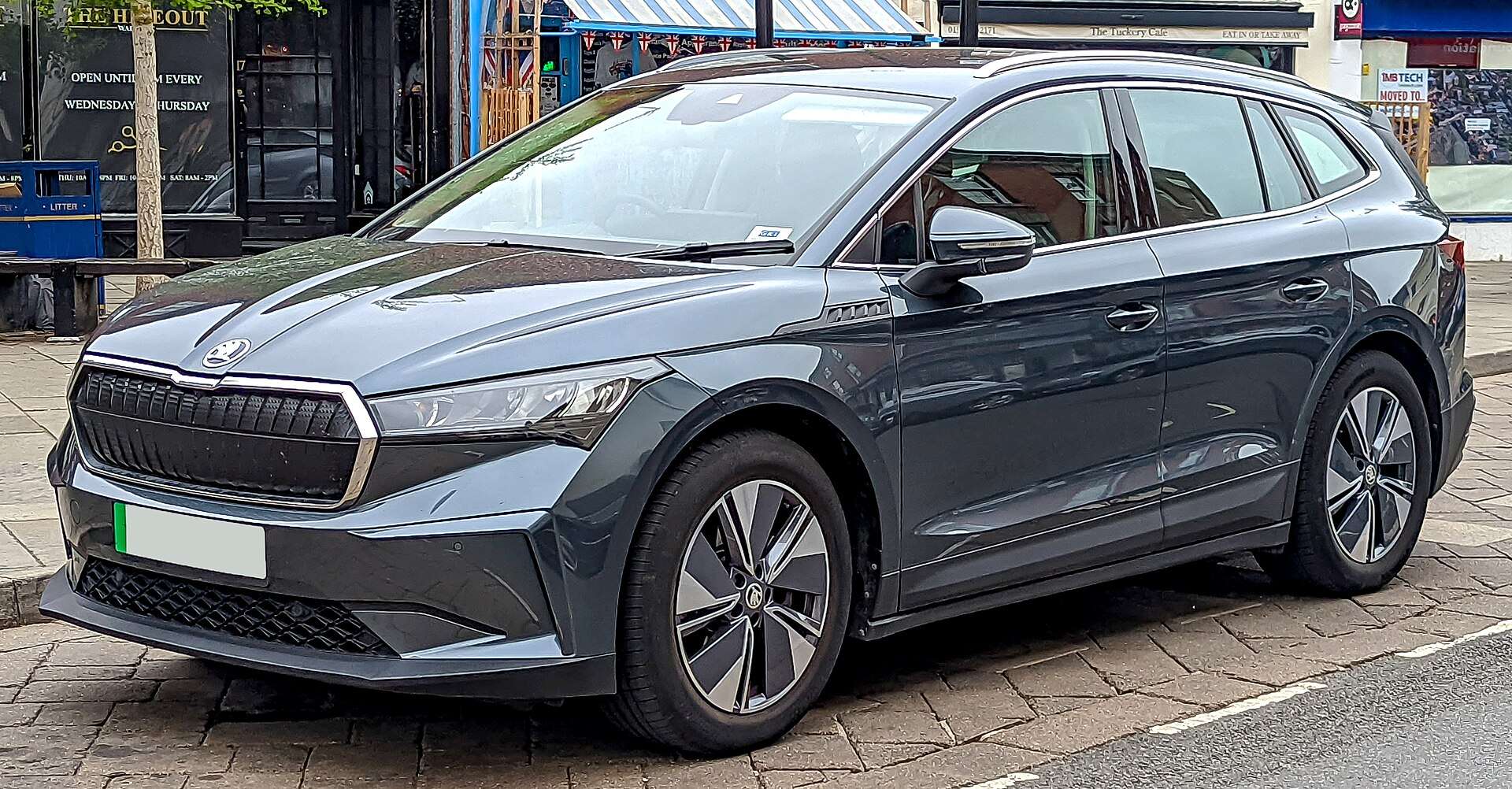
Enyaq iV photograph by Vauxford, CC BY-SA 4.0, resized for display.
Like our guides and unusual cars?
Get forgotten finds, useful motoring content and the most interesting car stuff from us by email.
Free to join. No spam. Unsubscribe whenever you like. See our privacy policy.