← Browse all Vauxhall diagnostic scanner guides
For a Corsa D engine-warning check, a reputable generic EOBD reader may be sufficient. For ABS, airbag, steering or Easytronic faults, shortlist a Vauxhall-aware tool with coverage for the actual controller. The iCarsoft OP V3.0 has a useful documentary basis for that shortlist: its official 2012 Corsa_D entry lists dedicated systems beyond the engine. It is a standalone handheld option, subject to the exact car and installed software. Genuine VAUX-COM is a Windows alternative for owners who want a supported laptop setup.
This is a desk-researched selection guide. Unusual Cars has not independently tested these tools on a Corsa D. A published function list is evidence of the manufacturer’s stated coverage, rather than a guarantee for every build.
Which Corsa does this cover?
This guide covers standard UK-market Corsa D three- and five-door cars from the 2006–2014 generation, with petrol or CDTI engines and the manual, conventional automatic or Easytronic transmission actually fitted. Vauxhall’s official Corsa chronology separates this generation from Corsa C and the 2014–2019 Corsa E. Registration dates overlap at changeovers, so identify the generation before choosing software.
The June 2012 UK manual includes 1.0, 1.2 and 1.4 petrol versions, 1.6 VXR derivatives and 1.3/1.7 CDTI diesels. That edition is a snapshot, not a complete engine list for the production run. Record the engine code and gearbox type as well as capacity. A VXR badge, ecoFLEX name or facelift does not establish a separate scanner requirement.
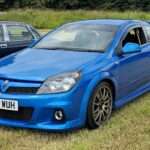
Corsa C, Corsa E, the later electric Corsa-e, other markets, engine swaps and aftermarket management are outside this guide. Modified cars need the documentation for the electronics now fitted. The VXR photograph illustrates the D-generation body; it does not prove diagnostic compatibility.
Corsa D scanner comparison
| Route | Useful Corsa D job | Setup and limitation |
|---|---|---|
| Generic EOBD handheld or phone setup | Supported emissions-related engine codes, freeze frame, readiness and standard live data | For a phone, both adapter and app must suit the device. Engine communication does not establish ABS, SRS, body or gearbox access. |
| iCarsoft OP V3.0 | Vauxhall-aware handheld shortlist for additional fitted modules | Official 2012 Corsa_D lookup includes ABS/ESP, ECM, SRS, power steering and Easytronic entries. Confirm the exact build and requested reading functions; menus can include equipment absent from your car. |
| Genuine VAUX-COM / OP-COM | Supported Windows-based Vauxhall diagnostics | Needs a compatible Windows computer, genuine intelligent USB interface and licensed software. The checked ilexa listing names Corsa D but does not establish every module/function combination. |
| Appropriately equipped workshop | Unresolved warnings, communication failures or work requiring specialist procedures | Ask for the original scan report and the diagnostic findings, rather than only a list of replacement parts. |
These routes answer different needs. If you already have an engine reader, retain its useful results before paying for another tool. If the concern is an ABS or airbag lamp, broader module access matters more than a long advertised reset list. Exact functions vary by vehicle build, module, software, interface and tool version.
Engine warning, spanner light or ABS light?
The June 2012 Corsa manual distinguishes the emissions malfunction indicator from “Service vehicle soon”. On printed page 79, it describes the latter’s engine-running indication as an engine or transmission electronics fault. It separately describes other indications, including one with InSP4. Read the full manual entry for the actual lamp and circumstances; a spanner symbol is not sufficient reason to perform an oil-service reset.
A generic reader concentrates on the emissions-related engine layer. Its “no codes” result cannot clear a warning generated by a different controller. Save which diagnostic mode was used and the name of the system that returned each result. Follow the owner’s manual for urgent warnings or abnormal braking, steering or running; this guide does not establish that the car is safe to drive.
A Corsa D ABS case: why the code is only the start
In a TOPDON Community case published in December 2025, contributor Petar described a 2012 Opel Corsa D with a persistent ABS lamp. The account says a TOPDON ONE read C0035 and that wheel-speed data showed no changing signal from the left front. Subsequent electrical investigation reportedly found an open wire, with the warning resolved after the wiring work.
This is an attributed workshop account hosted by a diagnostic-tool company, not an independent Unusual Cars test. It does not establish a fault rate, prove that a UK Vauxhall has identical electronics, or demonstrate iCarsoft compatibility. Its useful lesson is narrower: a code naming a wheel-speed circuit need not mean the sensor itself is the failed part. Reading the relevant controller and preserving its data is more useful than buying a sensor from the short description.
What the OP V3.0 evidence actually establishes
On 11 November 2026, we selected OP V3.0 → Vauxhall → 2012 → Corsa_D in the official iCarsoft function lookup. The result listed ABS/ESP, engine, SRS, power steering, body and instrument systems, plus conventional automatic and Easytronic/MTA entries. The expanded ABS/ESP entry specifically listed fault reading, fault-memory clearing, live data and module information.
This supports a manufacturer-aware handheld shortlist. It does not mean that every listed controller exists on one Corsa or that the sampled 2012 result proves all years and engines. In that lookup the Corsa_D year choices ran from 2007 to 2014; the generation itself began in 2006. A 2006 build therefore needs particular confirmation rather than being silently included in a tool-coverage promise.
The manufacturer’s OP V3.0 page describes a button-operated handheld with PC updates and no annual software subscription. Its general feature list includes active tests and service operations, but also says specific functions vary with model, year and ECU configuration. This guide recommends selecting by diagnostic reading needs. It makes no promise about coding, programming, ABS bleeding, calibrations, DPF regeneration or replacement-module setup.
VAUX-COM, phone apps and the complete setup
The ilexa VAUX-COM listing describes an official package with a genuine USB interface, licensed software, updates and UK support. It names Corsa D and lists Windows XP through Windows 10. We have not established Windows 11 support from that listing, so obtain current confirmation for your computer before purchase. The page showed an out-of-stock status alongside older in-stock wording when checked; confirm supply directly.
“OP-COM” in a marketplace title is not enough to establish that a package is genuine or licensed. Choose a traceable supported supplier; this guide does not recommend clone interfaces, unofficial downloads or disabling computer protections to install software.
A phone and reputable adapter can be convenient for generic engine information. Enhanced access depends on the actual app, interface and Corsa controller together. Bluetooth or Wi-Fi describes the connection, not the diagnostic depth. We have not established a complete enhanced mobile setup for this guide, so there is no phone-app recommendation for Corsa D ABS or SRS here.
Easytronic, automatic and diesel questions
Distinguish Easytronic automated manual from a conventional automatic before asking about gearbox diagnostics. The official 2012 lookup contains separate MTA and automatic entries. Request coverage for the fitted transmission controller and the exact functions you need. Gearbox noise, clutch wear and mechanical damage still need assessment even if no relevant electronic fault is stored.
For a CDTI engine, ask whether the specific engine software exposes the values relevant to the recorded fault. A scanner’s general DPF service icon does not establish that a particular Corsa has that equipment or that forced regeneration is supported or appropriate. This article covers saving diagnostic evidence, not performing regeneration or adaptations.
Scan and save before clearing
- Record the VIN/build, engine code, transmission, symptoms and exact warning lamps.
- Use the connection and ignition state specified by the tool instructions. Stop if the connector is damaged or the tool cannot identify the car reliably.
- Save the initial report, including which systems responded and which did not.
- Preserve the full code, suffix, status, module identity and available freeze frame. Photograph the screen if export is unavailable.
- Record relevant live values with units and operating conditions. A single unexplained number is rarely a diagnosis.
- Use the report to plan further investigation. Clear only after preserving evidence and understanding the reason, then record the outcome of an appropriate rescan.
Do not run commands merely because a menu appears. Brake, restraint, steering, security and programming procedures require their own vehicle-specific instructions and competence. No such procedures are supplied here.
Corsa D faults that need more than an engine-only reader
A scanner becomes more useful when it can identify which controller recorded the complaint. An engine-only “no codes” result cannot rule out a fault in the Corsa D’s steering, ABS, restraint or Easytronic system. The examples below separate documented fault reports from the diagnostic questions to ask; they are not a list of parts to replace.
EPS warning: C0545 and C0460 belong in the steering investigation
In its Corsa D steering-column repair report, ECU Testing describes intermittent or complete loss of assistance on 2006–2014 cars. It lists C0545 for the power-steering torque sensor and C0460 for the steering-position sensor, and explicitly places the stored faults in the electric power-steering system. That is a concrete reason to request EPS/steering-controller access rather than just generic engine OBD.
The supplier’s report concerns units it diagnoses and repairs. It does not mean every heavy-steering complaint has that cause, or that a particular scanner will expose every steering value on every Corsa. Save the exact code, its full description and the reporting controller. A sensor-labelled fault still needs a proper diagnosis; this guide does not provide steering tests or column-replacement instructions.
ABS warning: the code and the wheel data answer different questions
The C0035 owner case discussed above is useful because it includes both an ABS fault and a wheel-speed discrepancy. Reading the engine’s emissions memory would not substitute for that ABS report. The code directs attention to a circuit or signal; available wheel-speed data adds context about what the brake controller is seeing. Neither finding alone proves that the wheel sensor itself needs replacing. The reported wiring outcome in that individual case is a reminder to avoid ordering a sensor solely from a short code description.
| Warning or example | System to check | What an engine-only scan can miss |
|---|---|---|
| EPS light or loss of steering assistance | Fitted steering controller; confirm exact EPS support | Steering-system C0545/C0460 information described by the repair specialist. |
| ABS light with a wheel-speed concern | ABS/ESP | The brake controller’s own faults and any supported wheel-speed data. |
| Easytronic warning or gear-selection problem | Fitted MTA/Easytronic controller | Its separate fault memory; generic engine information is only part of the picture. |
| Airbag warning with no engine faults | SRS/airbag controller | The restraint system’s own report; a clear engine scan does not clear the warning. |
Easytronic: do not confuse a gearbox report with a relearn promise
On a car actually fitted with Easytronic, ask the supplier to confirm diagnostic reading for that transmission controller. A useful report identifies the unit, exact faults and current/intermittent status where available, alongside the engine scan. This is different from clutch adjustment, actuator commands or adaptation procedures. The presence of an Easytronic menu does not establish those functions, and a manual-gearbox Corsa does not acquire an Easytronic controller because the tool lists one.
For buying purposes, the practical question is therefore: can this exact product and software read my fitted ABS, SRS, steering and transmission systems? The manufacturer function lookup is a starting point, followed by confirmation of build, engine and gearbox. A generic OBD mode offered by the same handheld remains a narrower mode; select the correct Vauxhall diagnostic route for the information you need.
Love cool cars? Join Unusual Cars Club FREE!
Get forgotten motoring finds, stories, helpful car content and more.
Free to join. No spam. Unsubscribe whenever you like. See our privacy policy.
Corsa D scanner FAQs
Is the cheapest reader enough?
It may be enough for supported engine/emissions information. For an ABS, airbag, steering or transmission warning, choose coverage for that system rather than relying on the shared diagnostic socket.
Does VXR need a separate guide or scanner?
This guide keeps standard D-generation derivatives together because the initial buying decision is shared: generic engine information or broader Vauxhall-aware access. Match the engine and installed management to the tool. A tuned or swapped ECU can change the requirement, and the evidence here does not promise special VXR functions.
Will clearing a code turn the light off permanently?
Only resolving the cause can prevent a genuine recurring fault. Clearing is not a repair and can remove useful diagnostic context. A module may also refuse to clear a current fault.
What should I send the scanner supplier?
Use this request: “UK Corsa D, build year, engine code, gearbox and current symptoms as attached. Please confirm fault-code reading and available live data separately for engine, ABS/ESP, SRS and the fitted steering/transmission controller. State the required hardware, software version and computer/update requirements.” Keep the response with the order.
Related Unusual Cars guides
Browse the car diagnostic scanner directory. For the performance derivative’s ownership checks, read our Corsa D VXR buying guide; mechanical buying advice and scanner capability are separate questions.
Sources and research method
Documentary evidence reviewed on 11 November 2026. The official Vauxhall chronology establishes generation boundaries; the June 2012 UK manual supplies warning meanings and an engine-range snapshot. iCarsoft’s live function lookup supplies the stated 2012 coverage example, and its product page describes the handheld setup. ilexa supplies the genuine VAUX-COM package information. The attributed TOPDON Community case informs the ABS question only. These are the linked sources in the relevant sections above.
No independent vehicle or scanner testing was performed for this article. Product coverage and availability can change. The sampled lookup does not validate every Corsa D variant, and exact functions remain dependent on build, module, software, interface and tool version. Unsupported service and programming claims have been excluded.
Photograph credit
Featured photograph: Vauxford, 2007 Vauxhall Corsa VXR Turbo 1.6 Front, via Wikimedia Commons, CC BY-SA 4.0. Display resized; theme thumbnails may crop. The image illustrates a VXR version of the Corsa D, not diagnostic-tool compatibility.